CRM Workflow Automation: 15 Real-World Examples
15 real CRM workflow automation examples across sales, support, and customer success — what triggers each one and what it actually solves.
DevGlim Team
August 20, 2026
Looking to build this instead of buying it? See our Custom CRM Development service →
It's one thing to know that CRM workflow automation exists. It's another to picture exactly what it looks like running inside a real business — which trigger sets it off, what happens automatically, and who actually benefits. This article walks through 15 specific examples, drawn from how sales, marketing, support, and customer success teams actually use automation day to day.
Unlike a general list of workflow categories, each example here is written as a concrete scenario — the situation, the automation, and the outcome — so you can see exactly how it would apply to your own process. If you're earlier in your research, our CRM automation guide covers the foundational concepts, and 10 CRM workflows every business should automate covers where to prioritize.
Sales Examples
1. Instant Routing for High-Intent Website Visitors
Scenario: A visitor spends several minutes on a pricing page, then fills out a "contact sales" form.
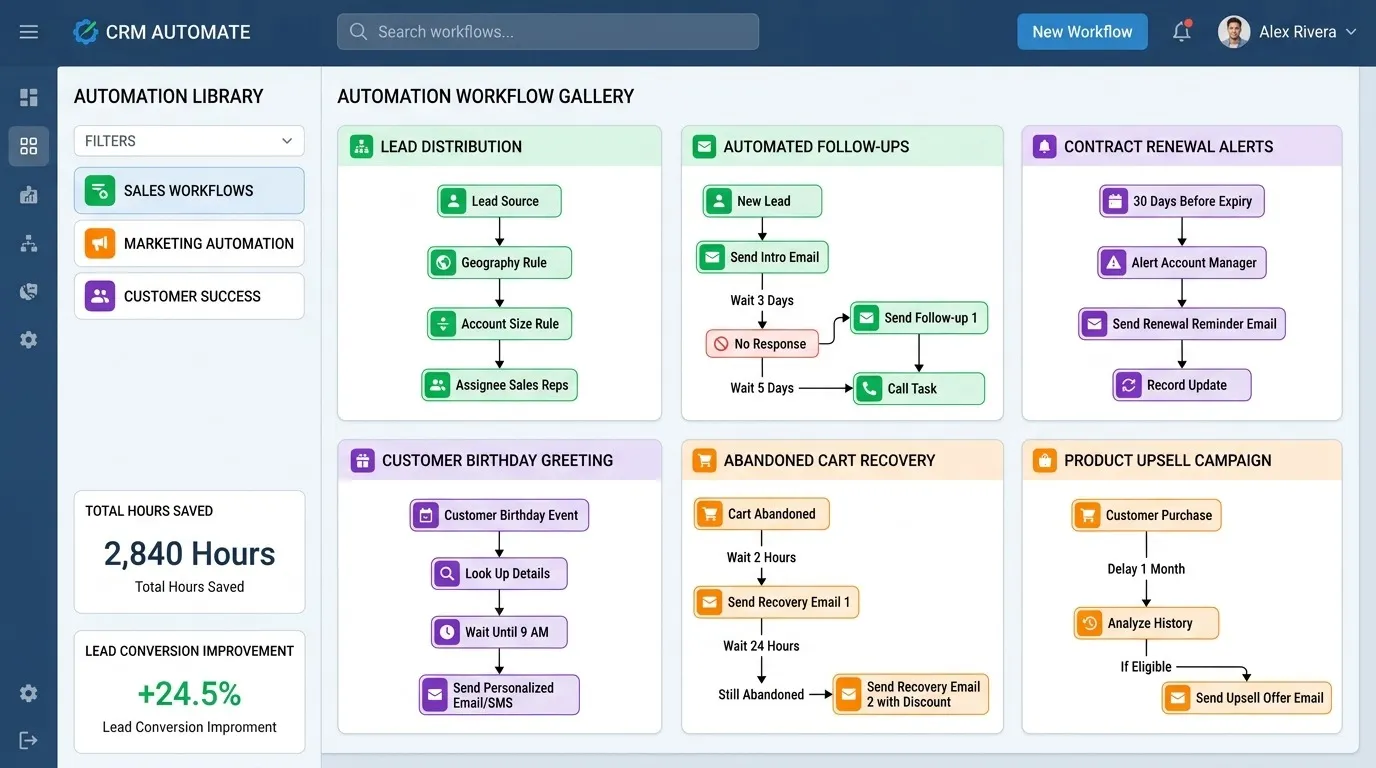
Automation: The CRM flags this as a high-intent lead based on the page-visit history attached to the form submission, routes it to a rep immediately rather than into the standard queue, and sends a push notification instead of a routine email alert.
Outcome: The rep calls within minutes of the form being submitted, while the prospect is still actively comparing options — often before they've filled out a competitor's form.
2. Round-Robin Assignment With Skill Matching
Scenario: A mid-sized sales team sells multiple product lines, and reps specialize in different ones.
Automation: Instead of pure round-robin, the CRM routes leads based on which product they expressed interest in, matching them to the rep with relevant expertise, and falls back to general round-robin only when no specialist match exists.
Outcome: Prospects talk to someone who can answer detailed product questions on the first call, rather than being transferred mid-conversation once a generalist rep hits the limits of their knowledge.
3. Automatic Task Creation After a Demo
Scenario: A rep finishes a product demo and marks the deal stage as "demo completed."
Automation: The CRM automatically creates a follow-up task for 24 hours later, pre-fills a proposal template with details discussed on the call, and reminds the rep if the follow-up hasn't happened within 48 hours.
Outcome: Post-demo follow-up — historically one of the easiest steps to let slip during a busy week — happens consistently instead of depending on individual rep discipline.
4. Deal Stagnation Escalation
Scenario: A sizable deal has sat in "negotiation" for three weeks without any logged activity.
Automation: The CRM notifies the rep first, then automatically loops in their manager if there's still no activity after another week, flagging the deal for a joint check-in.
Outcome: At-risk deals get management attention before they quietly become losses, rather than showing up as a surprise at the end of the quarter.
5. Multi-Touch Follow-Up After a Trade Show
Scenario: A company collects 200 leads at an industry conference over two days.
Automation: Leads are bulk-imported into the CRM, automatically tagged by the event, scored based on booth interactions logged during the show, and enrolled in an event-specific follow-up sequence that references the conference directly.
Outcome: All 200 leads get contacted within a day of the event ending, instead of the batch sitting untouched for a week while the team catches up on other work — by which point most conference leads have already lost momentum.
Marketing-to-Sales Handoff Examples
6. Marketing Qualified Lead (MQL) Handoff
Scenario: A lead downloads three gated resources and visits the pricing page within a two-week span.
Automation: The CRM automatically upgrades the lead's status from marketing-qualified to sales-ready based on this engagement pattern, notifies the assigned rep, and shares the full content engagement history so the rep has context before the first call.
Outcome: Sales reaches out with specific knowledge of what the lead has already engaged with, rather than opening with a generic cold-call script that ignores the research the lead has already done.
7. Re-Engagement of Dormant Marketing Leads
Scenario: A lead engaged heavily six months ago, went quiet, and hasn't interacted since.
Automation: After a set dormancy period, the CRM automatically moves the lead back into a marketing nurture sequence rather than leaving it stagnant in sales-owned status, with a rule to re-notify sales if engagement picks up again.
Outcome: Leads that would otherwise sit permanently unassigned and untouched get a second chance, without requiring anyone to manually audit the pipeline for forgotten leads.
8. Webinar Attendee Follow-Up
Scenario: 150 people register for a webinar; 60 actually attend live.
Automation: The CRM automatically tags attendees separately from no-shows, triggers a different follow-up sequence for each group (a recap and next-step offer for attendees, a recording link and lighter touch for no-shows), and notifies sales only about attendees who asked questions during the session.
Outcome: Follow-up matches actual engagement level instead of treating every registrant identically, and sales time goes toward the subset who showed the clearest buying signals.
Customer Success and Support Examples
9. New Customer Onboarding Kickoff
Scenario: A deal is marked "closed won."
Automation: The CRM automatically notifies the onboarding team, creates a kickoff call task due within 48 hours, and transfers the deal notes — including specific requirements the customer mentioned during the sales process — into the new customer record.
Outcome: Customers hear from someone on the onboarding team within two days of signing, instead of the multi-day silence that often happens when a handoff depends on someone remembering to send an internal message.
10. Support Ticket Escalation Based on Customer Tier
Scenario: A support ticket comes in from a customer on an enterprise plan.
Automation: The CRM automatically flags the ticket for priority handling based on the account's plan tier, routes it to a senior support rep rather than the general queue, and sets a shorter response-time target than standard tickets.
Outcome: High-value accounts get faster, more senior support automatically, without support staff having to manually check account status for every incoming ticket.
11. Renewal Reminder 90 Days Out
Scenario: A customer's annual contract is approaching its renewal date.
Automation: The CRM notifies the account owner 90 days before renewal, automatically pulls in usage and engagement data to flag whether the account looks healthy or at risk, and creates a task to schedule a renewal conversation.
Outcome: Renewal conversations happen with enough lead time to address concerns proactively, rather than starting only after the customer has already been silently weighing whether to leave.
12. Usage-Based Upsell Trigger
Scenario: A customer on a mid-tier plan consistently exceeds their usage limit for three consecutive months.
Automation: The CRM automatically flags the account for the customer success or sales team, attaching the specific usage data that supports an upsell conversation, rather than requiring someone to manually notice the pattern across dozens of accounts.
Outcome: Upsell conversations happen based on actual usage evidence, which tends to convert better than an untargeted upsell push, and accounts that are clearly outgrowing their plan get addressed before usage friction turns into dissatisfaction.
13. At-Risk Account Alert Based on Engagement Drop
Scenario: A customer who used to log in daily hasn't logged in for two weeks.
Automation: The CRM detects the drop in product engagement, automatically flags the account as at-risk, and notifies the customer success manager with a suggested check-in task.
Outcome: Disengagement gets addressed while there's still a relationship to save, instead of surfacing only when the customer cancels and it's too late to intervene.
Build Your own CRM Now
Operational and Reporting Examples
14. Weekly Pipeline Digest for Leadership
Scenario: A VP of Sales wants a consistent view of pipeline health without manually pulling a report every week.
Automation: The CRM automatically compiles a summary of new pipeline, stage movement, and forecast changes every Monday morning and distributes it before the weekly sales meeting, with an additional real-time alert if forecast numbers shift significantly outside that schedule.
Outcome: Leadership walks into the weekly meeting already informed, and significant changes get flagged immediately rather than waiting for the next scheduled report.
15. Data Hygiene Cleanup Workflow
Scenario: Over time, a CRM accumulates duplicate contact records, deals with missing close dates, and stale open deals that should have been marked lost.
Automation: A scheduled workflow scans for these specific issues — duplicate emails, deals with no activity in 60+ days, missing required fields — and either merges records automatically where the match is clear or flags them for manual review where it isn't.
Outcome: Data quality gets maintained continuously in the background instead of requiring a periodic manual cleanup project that everyone dreads and keeps postponing.
What These Examples Have in Common
Looking across all 15, a few patterns hold regardless of team or use case:
Every workflow has a specific, narrow trigger. None of these are vague "automate the sales process" workflows — each one fires based on a precise condition, which is what makes them reliable and easy to troubleshoot.
The automation removes a step that depended on someone remembering. Whether it's a follow-up task, a renewal reminder, or a handoff notification, the common thread is replacing "hopefully someone catches this" with a system that catches it every time.
Most of them feed each other. Clean activity data (#15) makes deal stagnation alerts (#4) more accurate. Accurate lead scoring (#6) makes routing (#1, #2) more effective. Workflows compound — which is part of why it's worth building them in a deliberate order rather than all at once, as covered in our guide on what to automate first for small businesses.
Building Your Own Version of These
None of these examples require an exotic platform — most standard CRM automation software supports the trigger types used across all 15. The harder part is usually deciding which ones apply to your specific process and building them with the right exit conditions and thresholds for your business, not the platform's default settings.
If you're building lead follow-up automation specifically, our guide on how to automate lead follow-ups covers sequence structure and timing in more depth than the examples above. For the full picture of how to plan and prioritize a complete rollout, start with the CRM automation guide.