What Is SaaS? A Complete Guide to Software as a Service
A clear, practical guide to SaaS — how it works, how it differs from other software models, pricing, security, and how to evaluate a SaaS product.
DevGlim Team
August 21, 2026
Looking to build this instead of buying it? See our SaaS Development service →
If you've used Gmail, Slack, Salesforce, Netflix, or Zoom, you've used SaaS — even if you've never used the term. Software as a Service has become the default way most businesses buy and use software, to the point that it's easy to forget it was ever done differently. This guide covers what SaaS actually means, how it works under the hood, how it differs from the software models that came before it, and what to actually look for when evaluating a SaaS product for your business.
What Is SaaS?
SaaS, short for Software as a Service, is a way of delivering software over the internet rather than installing it on an individual computer or server. Instead of buying a copy of a program and running it locally, you access the software through a web browser or lightweight app, while the actual application runs on the provider's servers.
The provider handles everything on the backend — hosting, maintenance, security patches, updates, and infrastructure — and customers pay a recurring subscription fee to use it, typically billed monthly or annually. This is the defining shift: software goes from something you own a copy of to something you access as an ongoing service, similar to how you'd think about electricity or internet access.
How SaaS Works
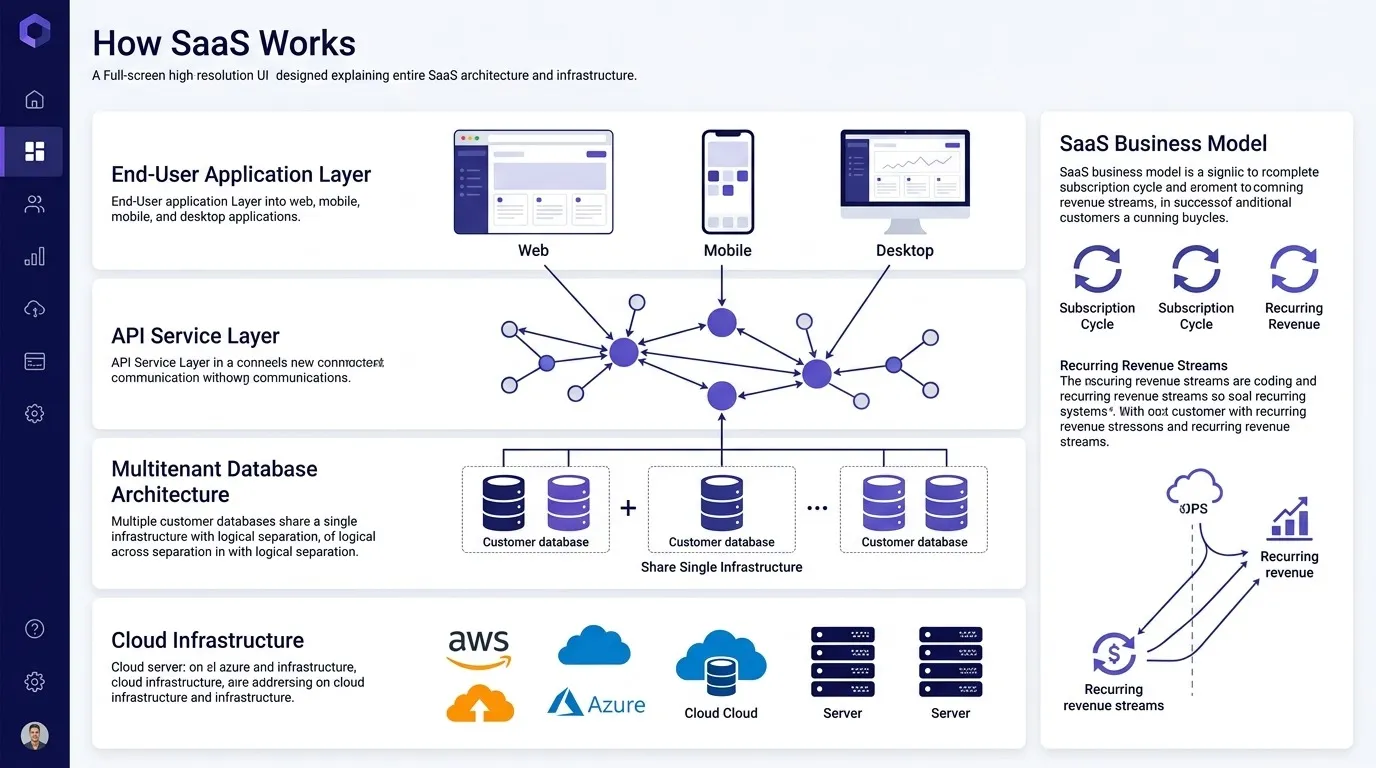
At a technical level, SaaS applications run on infrastructure owned and managed by the provider — either their own data centers or, more commonly today, a cloud platform like AWS, Google Cloud, or Microsoft Azure. Users connect to the application over the internet, and all the processing, storage, and computing happens remotely rather than on the user's own device.
Most SaaS platforms use a multi-tenant architecture, meaning a single instance of the software serves many different customers ("tenants") at once, with each customer's data kept logically separated and secure. This is what makes SaaS efficient to run at scale — the provider maintains one version of the application for everyone, rather than managing separate installations for each customer.
When the provider ships an update, every customer gets it automatically, without needing to manually download or install anything. This is a significant departure from traditional software, where updates were periodic, often paid, and required IT involvement to roll out across an organization.
SaaS vs. Other Software Delivery Models
Understanding SaaS is easier in contrast with the models it evolved from and the ones it's often compared to.
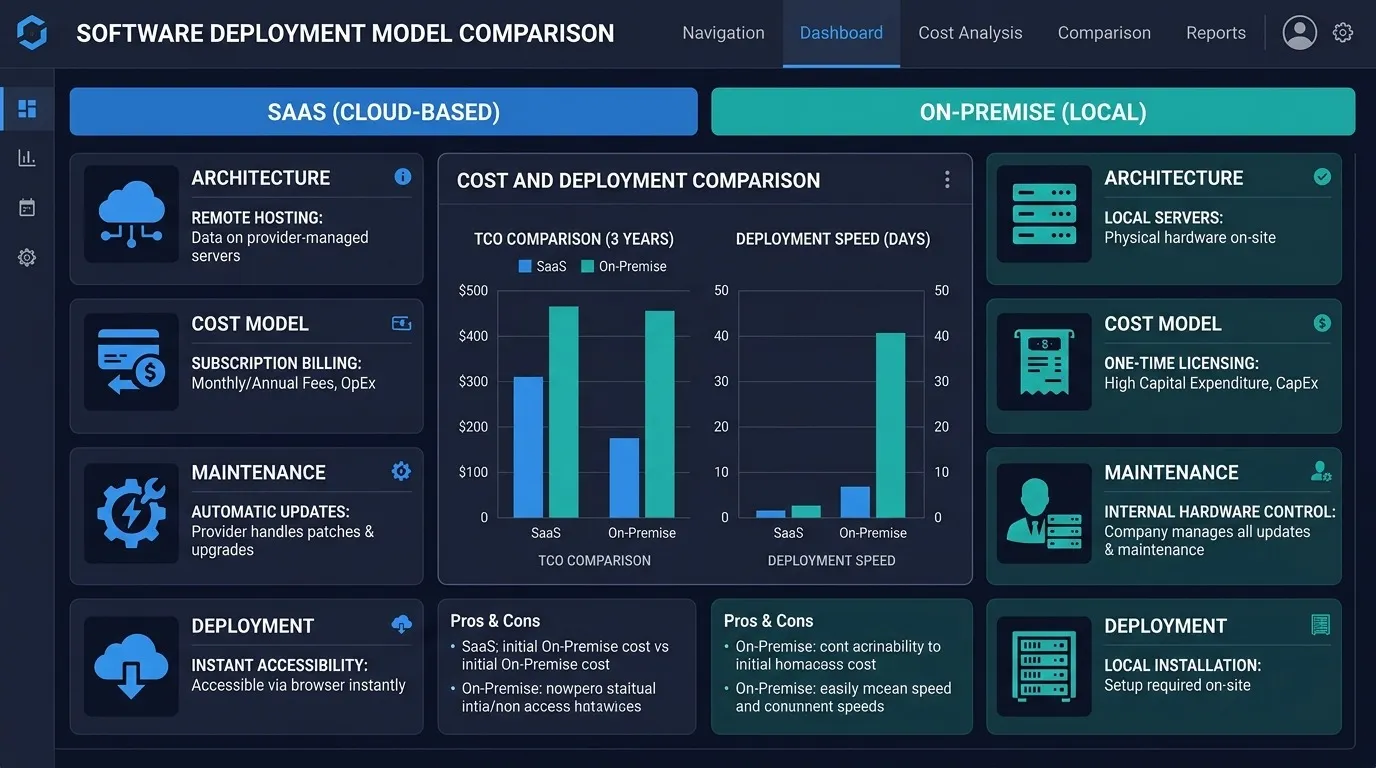
SaaS vs. On-Premise Software
Traditional on-premise software is installed directly on a company's own servers or individual computers, and the company is responsible for hosting, maintaining, and securing it themselves. This usually involves a large upfront license cost, dedicated IT infrastructure, and internal staff to manage updates and troubleshoot issues.
SaaS removes nearly all of that responsibility from the customer. There's no infrastructure to maintain, no manual update process, and typically a much lower upfront cost, since you're paying for access rather than buying a perpetual license. The tradeoff is less control — you're dependent on the provider's uptime, roadmap, and pricing decisions rather than running software entirely on your own terms.
SaaS vs. PaaS vs. IaaS
SaaS is one of three commonly discussed cloud service models, and the distinction between them comes down to how much of the technology stack the provider manages versus what the customer builds themselves.
- IaaS (Infrastructure as a Service) provides raw computing infrastructure — servers, storage, networking — that customers use to build and run whatever they want. Amazon EC2 and Google Compute Engine are common examples. The customer manages the operating system, applications, and everything above the infrastructure layer.
- PaaS (Platform as a Service) provides a platform for building and deploying applications without managing the underlying infrastructure. The provider handles servers and operating systems; the customer focuses on writing and deploying application code. Heroku and Google App Engine are common examples.
- SaaS (Software as a Service) provides a complete, ready-to-use application. The customer doesn't manage infrastructure or write code — they just use the software as-is.
A useful way to remember the distinction: IaaS gives you the building blocks, PaaS gives you a workshop to build with, and SaaS gives you the finished product.
SaaS vs. Licensed Software
Licensed software is typically a one-time purchase that grants the right to use a specific version of a program, often installed locally, with major version upgrades sold separately. SaaS replaces that one-time purchase with an ongoing subscription that includes continuous updates as part of the price — you're always on the current version, but you also lose access if the subscription lapses, unlike a perpetual license.
Common Characteristics of SaaS Products
While SaaS spans an enormous range of products — from email to accounting software to CRM platforms — most SaaS products share a set of defining characteristics:
Subscription-based pricing. Customers pay recurring fees, typically monthly or annually, rather than a one-time purchase.
Accessible from any device with internet access. Since the software runs in the provider's infrastructure rather than locally, users can access it from a browser or app on virtually any device, without installation.
Automatic updates. New features, bug fixes, and security patches roll out to all customers automatically, without requiring manual installation.
Scalable usage. Most SaaS pricing scales with usage — number of users, storage, feature tiers — so customers can start small and expand as their needs grow, without needing to buy new infrastructure.
Multi-tenant architecture. A single version of the software serves all customers, which is what allows providers to ship updates and maintain the platform efficiently at scale.
Examples of SaaS Across Categories
SaaS spans nearly every category of business software today. Some familiar examples by category:
Communication and collaboration: Slack, Zoom, Microsoft Teams Customer relationship management: Salesforce, HubSpot Project management: Asana, Trello, Monday.com Accounting and finance: QuickBooks Online, Xero Design and creative tools: Canva, Figma Email and productivity: Gmail, Google Workspace, Microsoft 365 Entertainment and streaming: Netflix, Spotify (technically consumer SaaS, delivered on the same underlying model)
The breadth of this list is part of the point — SaaS isn't a single category of product, it's a delivery and business model that now underlies most modern software, regardless of what the software actually does.
Advantages of SaaS
Lower upfront cost. Subscription pricing avoids the large capital expense of buying licenses and infrastructure outright, which lowers the barrier to trying and adopting new software.
No infrastructure to manage. Hosting, servers, and maintenance are the provider's responsibility, which removes a significant ongoing burden from a company's internal IT resources.
Automatic updates and improvements. Customers benefit from continuous improvement without needing to plan and execute upgrade projects themselves.
Accessibility. Because SaaS is delivered over the internet, employees can access the software from anywhere, which has become increasingly important as remote and hybrid work have become standard.
Faster deployment. New employees or teams can typically be onboarded onto a SaaS product in minutes, compared to the days or weeks sometimes required to install and configure traditional software.
Predictable costs. Subscription pricing makes budgeting more predictable than the irregular, large upfront costs associated with traditional software licensing and periodic upgrade cycles.
Disadvantages of SaaS
Ongoing cost over time. While the upfront cost is lower, subscription fees accumulate over years of use, and for long-term, stable use cases, the total cost can sometimes exceed what a traditional license would have cost.
Dependence on internet connectivity. Because SaaS runs remotely, a lost internet connection typically means lost access to the software, unlike locally installed applications that can often still function offline.
Less control over updates. Automatic updates are usually a benefit, but they can also introduce unwanted changes to a workflow a team has grown used to, without the customer having a say in the timing.
Data residency and control considerations. Customer data lives on the provider's infrastructure rather than the customer's own servers, which matters for organizations with strict data residency, compliance, or security requirements.
Vendor lock-in. Migrating away from a SaaS platform once a business has built processes and data around it can be difficult and time-consuming, particularly if the provider doesn't offer straightforward data export options.
How SaaS Pricing Typically Works
SaaS pricing varies significantly, but most platforms use some combination of the following models:
Per-user pricing. The most common model for business software — cost scales with the number of people using the platform.
Tiered pricing. Different feature sets bundled into tiers (commonly named something like Starter, Professional, and Enterprise), with higher tiers unlocking more advanced features, higher usage limits, or dedicated support.
Usage-based pricing. Cost scales with actual consumption — API calls, storage used, transactions processed — rather than a fixed per-user fee. This is increasingly common for infrastructure-adjacent and data-heavy SaaS products.
Freemium models. A free tier with limited features, designed to let users try the product before upgrading to a paid plan as their needs grow.
Understanding which pricing model a SaaS product uses matters when evaluating cost at scale — a per-user model can get expensive quickly for a large team, while a usage-based model might be unpredictable for a business with variable activity levels.
SaaS Security and Compliance Considerations
Because SaaS involves handing data over to a third-party provider, security and compliance are legitimate considerations, not just a checkbox exercise. A few things worth evaluating when assessing a SaaS product:
Data encryption. Data should be encrypted both in transit and at rest, which is standard practice among established SaaS providers but worth confirming rather than assuming.
Compliance certifications. Depending on your industry, look for relevant certifications — SOC 2, ISO 27001, HIPAA compliance for healthcare, GDPR compliance for handling EU customer data — as evidence of independently verified security practices.
Data ownership and export. Understand whether you retain ownership of your data and how easily it can be exported if you ever need to switch providers. Vague or restrictive export policies are a warning sign.
Access controls. Look for role-based permissions, single sign-on support, and audit logs, particularly for platforms that will store sensitive business or customer data.
Uptime history and SLAs. Established providers typically publish uptime statistics and offer service-level agreements. A pattern of unexplained outages is worth investigating before committing.
How to Evaluate a SaaS Product Before Buying
With so many SaaS options available in nearly every category, a structured evaluation process helps avoid choosing based on marketing alone.
Start with the specific problem you're solving. It's easy to get pulled toward a feature-rich platform that solves problems you don't actually have. Define what you need first, then evaluate products against that list.
Test with real data and real users, not just a demo. Sales demos are built to look good. A trial period using your actual data and workflow will surface friction points a demo won't.
Check integration compatibility. Confirm the SaaS product connects natively with the other tools your team already relies on — a platform that requires custom integration work for basic connections adds ongoing cost and complexity.
Understand the full pricing structure, not just the advertised price. Check whether the features you need are included in the plan you're evaluating, or whether they require an upgrade to a more expensive tier.
Ask about data export and offboarding. Before committing, confirm what happens to your data if you decide to leave — this is far easier to ask before signing than to negotiate after you're dependent on the platform.
Build your own SaaS Now
The Future of SaaS
A few trends are shaping where SaaS is heading:
AI-native features are becoming standard. Many SaaS platforms are integrating AI directly into core workflows rather than offering it as a separate add-on, changing what "table stakes" functionality looks like across categories.
Vertical SaaS is growing. Rather than broad, general-purpose platforms, more SaaS products are being built specifically for narrow industries — legal, healthcare, construction — with workflows tailored to that industry's specific needs.
Usage-based pricing is spreading beyond infrastructure tools. As AI features add variable costs for providers, more SaaS platforms are shifting at least part of their pricing to usage-based models rather than flat per-user fees.
Consolidation pressure continues. Businesses managing dozens of separate SaaS subscriptions are increasingly looking to consolidate onto fewer platforms with broader functionality, which is shaping how SaaS companies bundle and price their products.
Frequently Asked Questions
Is SaaS the same as cloud computing? Not exactly. Cloud computing is the broader category of delivering computing resources over the internet, and SaaS is one specific model within it, alongside PaaS and IaaS. All SaaS is cloud computing, but not all cloud computing is SaaS.
Do I need technical knowledge to use SaaS? Generally no. Most SaaS products are designed to be used directly by end users through a browser or app, without requiring installation, server management, or technical setup — that's a core part of the appeal compared to traditional enterprise software.
Is SaaS more secure than on-premise software? It depends on the provider. Established SaaS companies often have more robust, dedicated security resources than a typical business would maintain in-house, but security still varies significantly between providers, which is why checking certifications and practices directly matters.
Can I use SaaS offline? Most SaaS products require an internet connection, since the software runs on the provider's servers rather than locally. Some offer limited offline functionality with data syncing once connectivity is restored, but this varies by product.
What happens to my data if I cancel a SaaS subscription? This varies by provider and should be confirmed before signing up. Reputable providers offer a data export option and a grace period before deleting account data; less transparent providers may not make this easy, which is why it's worth checking in advance.
Summary
SaaS has become the default way most businesses buy software because it removes the infrastructure burden, upfront cost, and maintenance responsibility that used to come with running software in-house. The tradeoff is ongoing subscription cost, dependence on a third-party provider, and less direct control — tradeoffs that make sense for most businesses, but that are worth understanding clearly rather than assuming away. Whether you're evaluating your first SaaS purchase or trying to explain the model to a colleague, the core idea is straightforward: instead of owning software, you're accessing it as a service, and someone else is responsible for making sure it works.