How Does SaaS Work? Architecture, Infrastructure & Business Model Explained
A practical breakdown of how SaaS actually works — multi-tenant architecture, cloud infrastructure, security, and the subscription business model behind it.
DevGlim Team
August 21, 2026
Looking to build this instead of buying it? See our SaaS Development service →
If you've read our guide on what SaaS is, you already know the basic idea: instead of buying software and installing it on your own servers, you access it over the internet and pay for it as a subscription. That's the what. This guide is about the how — what's actually happening under the hood when you log into a SaaS product, and how the business behind it makes that work at scale.
Understanding this matters for a few different audiences. If you're evaluating SaaS vendors, knowing how the architecture works helps you ask better questions about uptime, data isolation, and security. If you're a founder or product manager building a SaaS company, this is the operational backbone you're signing up to run. And if you're just trying to understand why your monthly software bill looks the way it does, the business model section will explain a lot.
There are three layers to this: the technical architecture that delivers the software, the infrastructure that hosts it, and the business model that pays for all of it. They're covered in that order below, because each one depends on the one before it.
The Basic Idea: One Application, Many Customers
Traditional software was built to be installed. A company would buy a license, install the application on its own servers or employees' computers, and manage everything — updates, security patches, backups — itself. Every installation was its own separate, isolated copy of the software.
SaaS flips this. Instead of thousands of separate installations, there's typically one application, running on infrastructure the vendor controls, serving every customer at once through a web browser or API. The vendor is responsible for keeping it running, secure, and up to date. Customers just use it.
That shift — from software you install to software you access — is what makes almost everything else about SaaS possible, including how it's built and how it's sold.
Multi-Tenancy: The Architectural Core of SaaS
The single most important architectural concept in SaaS is multi-tenancy. It's also the one that's easiest to get a vague, hand-wavy explanation of, so it's worth being precise about.
In a multi-tenant system, a single instance of the application serves multiple customers — called tenants — while keeping each tenant's data logically separated. You and a competitor could both be using the exact same CRM platform, on the exact same servers, running the exact same code, without ever seeing each other's data. The application itself enforces that separation, usually by tagging every record with a tenant ID and filtering every query by it.
This is different from single-tenancy, where each customer gets their own dedicated instance of the application and, often, their own dedicated infrastructure. Some SaaS vendors — particularly in healthcare, finance, or other heavily regulated industries — still offer single-tenant deployments for customers who need stronger isolation guarantees. But most SaaS, especially at the small-to-midmarket end, runs multi-tenant, because it's dramatically more efficient to operate.
Why multi-tenancy matters operationally:
- Cost efficiency. One set of servers serves thousands of customers instead of one. This is the single biggest reason SaaS can be priced the way it is.
- Easier updates. Ship a fix or a new feature once, and every customer gets it immediately. No coordinating rollout schedules across thousands of separate installations.
- Shared infrastructure load. Usage patterns average out across a large customer base, so the vendor can plan capacity more predictably than if every customer ran their own isolated environment.
The tradeoff is that multi-tenancy puts a lot of weight on the application's data-isolation logic. A bug in how tenant IDs are filtered isn't a minor issue — it's the kind of bug that can expose one customer's data to another. This is why serious SaaS vendors invest heavily in access control testing, and why security audits like SOC 2 and ISO 27001 are so central to enterprise SaaS purchasing decisions.
SaaS Architecture: How the Application Is Actually Built
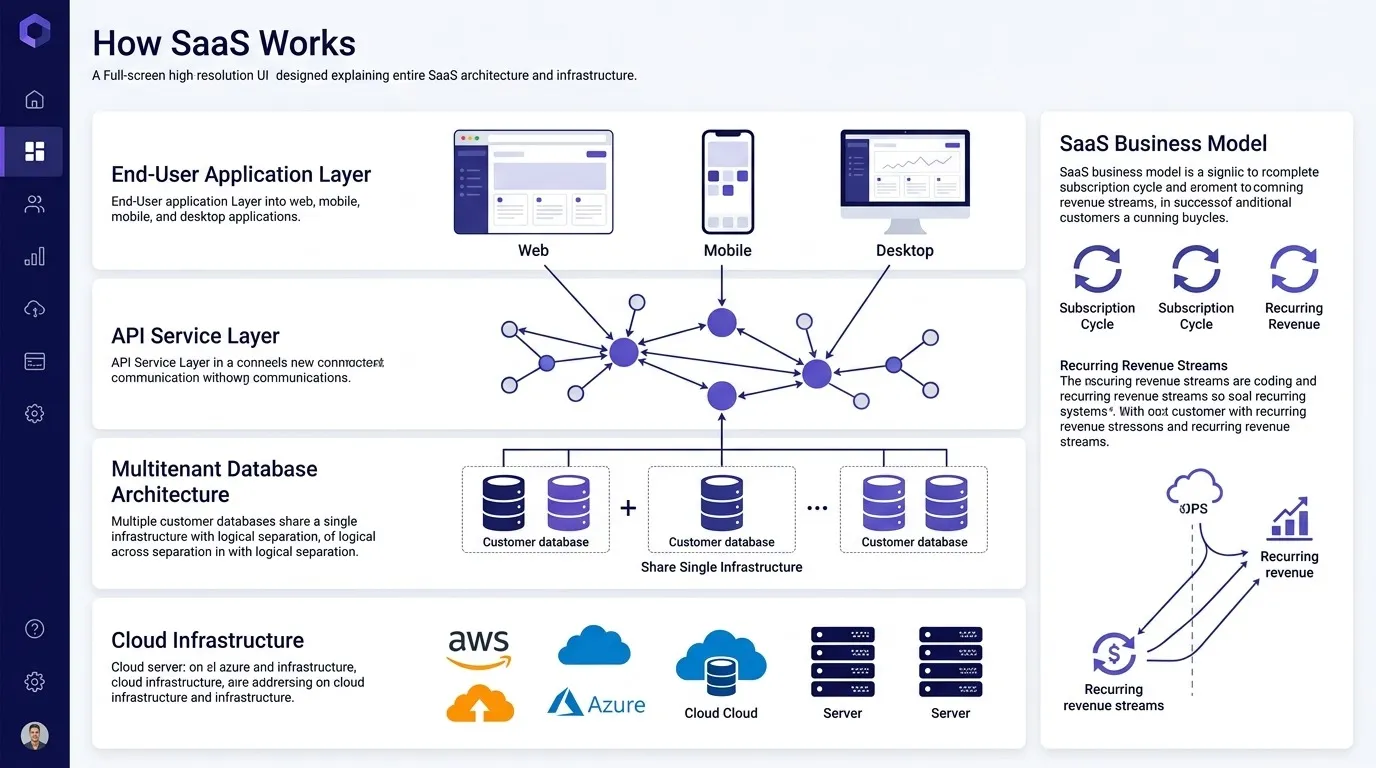
Most SaaS applications are structured in layers, even if the exact terminology varies by vendor.
Presentation layer (front end). This is what the user actually sees and interacts with — the web interface, and increasingly, mobile apps and browser extensions that hit the same underlying system.
Application layer (back end / business logic). This is where the actual work happens: processing a request, running calculations, enforcing permissions, triggering workflows. In a CRM, for example, this is the layer that decides what happens when a deal moves to Closed Won — updating records, firing notifications, kicking off an automation.
Data layer. Databases that store everything — customer records, configuration, usage history. In multi-tenant systems, this layer is where tenant isolation is enforced, either through shared databases with tenant-ID filtering, separate schemas per tenant, or, for some large customers, fully separate databases.
Integration layer. APIs and webhooks that let the SaaS product talk to other software — email platforms, payment processors, other internal tools. Modern SaaS products are rarely used in isolation; this layer is what makes them part of a broader stack rather than a walled-off tool.
A lot of SaaS products today are also built using microservices rather than one large monolithic application — breaking the application layer into smaller, independently deployable services such as billing, notifications, and search. This isn't universal, and plenty of successful SaaS companies run perfectly well on more monolithic architectures, especially early on. But as products scale, microservices tend to make it easier to update one part of the system without redeploying the whole thing.
SaaS Infrastructure: Where SaaS Actually Runs
Almost no SaaS company owns physical servers anymore. Instead, the application runs on infrastructure rented from a cloud provider — most commonly AWS, Microsoft Azure, or Google Cloud. This is worth understanding on its own, separate from the application architecture above.
Cloud hosting. The vendor rents compute, storage, and networking capacity from a cloud provider instead of buying and maintaining physical hardware. This is a big part of why SaaS companies can launch and scale quickly compared to the old model of provisioning their own data centers.
Elastic scaling. Cloud infrastructure can expand or contract based on demand. If a SaaS product suddenly gets a spike in usage — a big customer onboarding, a product going viral — the infrastructure can automatically provision more capacity, then scale back down when demand drops. This is handled through tools like auto-scaling groups, container orchestration (Kubernetes is the common one), and load balancers that distribute traffic across servers.
Containers and orchestration. Many SaaS applications are packaged into containers — self-contained units that bundle the application with everything it needs to run — which makes them portable across environments and easier to scale horizontally, by running more copies, rather than vertically, by making one server bigger.
Content delivery and redundancy. To keep the product fast and available globally, SaaS vendors typically distribute infrastructure across multiple data center regions, use CDNs (content delivery networks) to serve static content closer to users, and build in redundancy so that if one server or even one entire data center region fails, traffic reroutes elsewhere without customers noticing.
Uptime commitments. This infrastructure is what makes SLA (service level agreement) commitments possible — a vendor promising 99.9% uptime is really making a claim about how well this whole stack is architected for redundancy and failover.
SaaS Security and Compliance
Because SaaS runs on shared infrastructure serving many customers at once, security isn't optional or bolted on — it has to be built into every layer described above. A few pieces worth knowing:
- Encryption. Data is typically encrypted both in transit, moving between the user's browser and the vendor's servers, and at rest, stored in the database.
- Authentication and access control. Beyond basic logins, most business SaaS products support single sign-on (SSO) and role-based permissions, so companies can control exactly who can see and do what within the platform.
- Compliance certifications. Frameworks like SOC 2, ISO 27001, GDPR, and HIPAA for healthcare-adjacent products exist because customers need assurance that a vendor's multi-tenant environment is actually secure, not just claimed to be. For any SaaS purchase involving sensitive data, checking for these certifications is a legitimate part of vendor evaluation.
- Data residency. Some customers, particularly outside the U.S., need to know which physical region their data is stored in for regulatory reasons — another thing the underlying cloud infrastructure has to support.
The SaaS Business Model: How This Gets Paid For
The architecture above only makes sense in the context of how SaaS companies actually make money, because the technical model and the business model reinforce each other.
Subscription pricing. Instead of one large upfront license fee, customers pay recurring — monthly or annual — fees to keep using the product. This is only viable because multi-tenant infrastructure keeps the cost of serving each additional customer relatively low, especially past a certain scale.
Common SaaS pricing structures:
- Per-user / per-seat pricing — cost scales with the number of people using the product; common in CRM, project management, and communication tools.
- Usage-based pricing — cost scales with consumption, such as number of API calls, emails sent, or data processed.
- Tiered pricing — different feature sets bundled into Basic, Pro, and Enterprise-style plans.
- Flat-rate pricing — a single price regardless of usage or seats, less common but still used for simpler products.
Many SaaS companies blend these — a base platform fee plus per-seat costs, for example.
Why the recurring model matters strategically. Subscription revenue means a SaaS company's success depends on retention, not just new sales. A customer who churns after three months is a loss the company has to work hard to replace, which is why so much SaaS product investment goes into onboarding, customer success, and continuously shipping improvements — the ongoing relationship is the business model, not a one-time transaction.
The cost side. On the vendor's side, the major ongoing costs are cloud infrastructure — paying AWS, Azure, or GCP for the compute and storage described above — engineering, and customer success and support. Because so much of this cost scales with usage rather than being fixed, SaaS companies pay close attention to metrics like cost-to-serve per customer and gross margin, meaning how much of each subscription dollar is left after infrastructure costs.
Freemium and free trials. Because the marginal cost of adding one more user to a multi-tenant system is low, many SaaS companies can afford to offer free tiers or trials as a customer acquisition strategy — something that would have been far more expensive under the old model of shipping physical software or provisioning dedicated servers per customer.
How These Three Layers Work Together
None of these three layers exists independently. Multi-tenant architecture is what makes the low per-customer cost possible. Cloud infrastructure is what makes multi-tenancy scalable and reliable without the vendor owning physical hardware. And the subscription business model is what makes sense given those two things: predictable recurring revenue matched against a cost base that scales, fairly efficiently, with usage.
This is also why the three layers tend to break down together when something goes wrong. An infrastructure outage isn't just a technical problem — it's a business problem, because it directly threatens the retention the subscription model depends on. A flaw in multi-tenant data isolation isn't just an engineering bug — it's a compliance and trust problem that can undo years of customer relationships. Understanding SaaS as one connected system, rather than three separate topics, is what makes it possible to evaluate a vendor properly instead of taking uptime and security claims at face value.
Frequently Asked Questions
Is multi-tenant SaaS less secure than single-tenant? Not inherently. Multi-tenant systems rely on the application layer to enforce data isolation between customers, while single-tenant systems rely on physical or infrastructure-level separation. Both can be secure or insecure depending on how well they're implemented — multi-tenancy just shifts where that responsibility sits.
Why do most SaaS companies use cloud providers like AWS instead of their own servers? Renting infrastructure from a cloud provider avoids the upfront cost and lead time of building physical data centers, and gives SaaS companies elastic capacity that can scale up or down with demand — something that's difficult and expensive to replicate with owned hardware.
What does multi-tenant architecture mean in simple terms? It means one version of the software, running on shared infrastructure, serves many different customers at once, while keeping each customer's data separate and private from the others.
How does SaaS pricing relate to the underlying architecture? Multi-tenant, cloud-hosted architecture keeps the cost of serving each additional customer relatively low, which is what makes subscription pricing — including free trials and freemium tiers — financially viable in a way it wouldn't be for individually installed, single-tenant software.
What happens if a SaaS provider's infrastructure goes down? Reputable providers build in redundancy across multiple servers and data center regions specifically so that a single failure doesn't take the whole platform down. Uptime history and published SLAs are worth checking before committing to a vendor, since they reflect how seriously a provider has invested in this redundancy.
Summary
SaaS works because three layers reinforce each other. Multi-tenant architecture lets one application serve many customers efficiently. Cloud infrastructure makes that architecture scalable and reliable without the vendor owning physical hardware. And the subscription business model turns that efficiency into predictable, recurring revenue — while making the vendor's success dependent on keeping customers, not just acquiring them.
When you're evaluating a SaaS vendor — whether it's a CRM platform, a marketing automation tool, or anything else — these are the questions worth asking underneath the sales pitch: How is my data isolated from other customers? What happens if there's an infrastructure outage? What compliance certifications do they hold? And does their pricing model actually match how my team will use the product? Understanding how SaaS works architecturally makes all of those questions easier to ask, and easier to evaluate the answers to.